Sync Metrics Export
This application can export various sync related metrics, which can be used to monitor the sync activities and status. Two independent exporters are available:
- A file, formatted using the Influx Line Protocol, containing every status change as an event (described below)
- A Prometheus/OpenMetrics endpoint, exposing the current state and aggregated metrics to be scraped
Usage
Set the export metrics flag, in order to activate the exporter. The file will be written to the root of the data directory and is named .icloud-photos-sync.metrics. It is truncated upon application start. This file can be consumed using telegraf's tail input plugin. The following is a sample configuration:
[[inputs.tail]]
  files = ["/opt/icloud-photos-library/.icloud-photos-sync.metrics"]
  data_format = "influx"
Grafana Dashboard
After importing the metrics into an InfluxDB through telegraf, you can use Grafana to visualize the data. The following example is available for download:
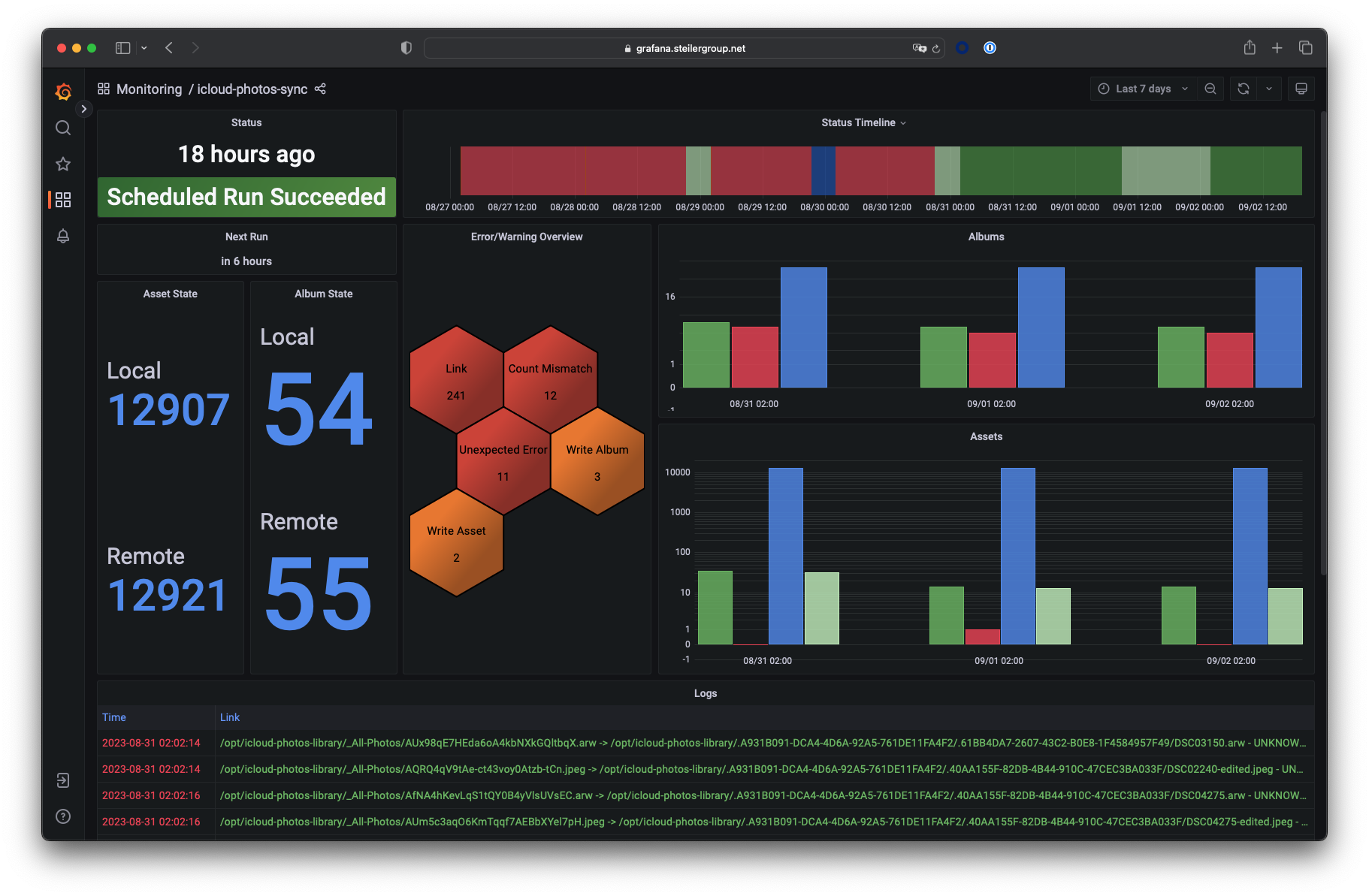
When importing the JSON model you need to provide an InfluxDB datasource that supports InfluxQL. InfluxDB 1.X supports this out of the box, InfluxDB 2.X needs to be configured to support InfluxQL.
Additionally you need to specify the measurement name, where the sync metrics are stored. For InfluxDB 1.X this should always be icloud_photos_sync (as this is specified in the Influx Line Protocol written by this tool), InfluxDB 2.X however needs to include the database and retention policy mapping in the measurement query. This could be something like example-db.example-rp.icloud_photos_sync, but depends on the DBRP mapping you previously created.
Metrics
All metrics are created using the measurement name icloud_photos_sync. Each data point carries a nanosecond precision timestamp.
The following fields will be written:
status: Provides a string of the current sync progress status. This can include:AUTHENTICATION_STARTEDAUTHENTICATEDMFA_REQUIREDMFA_RECEIVEDMFA_NOT_PROVIDED(if the MFA code was not provided before timeout)DEVICE_TRUSTEDSESSION_EXPIRED(if the current session expired and needs to be refreshed)ACCOUNT_READYPCS_REQUIRED(the Advanced Data Protection account requires the data access to be approved)PCS_NOT_READY(the data access was not approved yet, the request is retried)ICLOUD_READYSYNC_STARTFETCH_N_LOAD_STARTEDFETCH_N_LOAD_COMPLETEDDIFF_STARTEDDIFF_COMPLETEDWRITE_STARTEDWRITE_ASSETS_STARTEDWRITE_ASSETS_COMPLETEDWRITE_ALBUMS_STARTEDWRITE_ALBUMS_COMPLETEDWRITE_COMPLETEDSYNC_COMPLETEDSYNC_RETRYERRORSCHEDULED(no previous run)SCHEDULED_SUCCESS(last run successful)SCHEDULED_FAILURE(error during last run)SCHEDULED_OVERRUN(scheduled run skipped, because another sync or re-authentication was still in progress)
status_time: Provides the time, when the status was last updated (integer, milliseconds since epoch)- Local and remote library state:
local_assets_loaded: Gives the amount of local assets loaded during a synclocal_albums_loaded: Gives the amount of local albums loaded during a syncremote_assets_fetched: Gives the amount of remote assets loaded during a syncremote_albums_fetched: Gives the amount of remote albums loaded during a sync
- Sync metrics:
assets_to_be_added: Gives the amount of assets that are meant to be added after diffing the local and remote stateassets_to_be_kept: Gives the amount of assets that are meant to be kept after diffing the local and remote stateassets_to_be_deleted: Gives the amount of assets that are meant to be deleted after diffing the local and remote stateasset_written: The file checksum of each asset written to disk (the base of its file name in_All-Photos)albums_to_be_added: Gives the amount of albums that are meant to be added after diffing the local and remote statealbums_to_be_kept: Gives the amount of albums that are meant to be kept after diffing the local and remote statealbums_to_be_deleted: Gives the amount of albums that are meant to be deleted after diffing the local and remote state
- Daemon metrics:
next_schedule: Gives the time of the next scheduled execution (integer, milliseconds since epoch)
- Archive metrics:
assets_archived: Gives the amount of assets to be archived, written when archiving startsremote_assets_deleted: Gives the amount of remote assets to be deleted, written when the remote deletion starts
errors: Gives an error message for each recorded error- Warnings (see common warnings for context), gives a message for each recorded warning
warn-count_mismatchwarn-library_load_errorwarn-extraneous_filewarn-icloud_load_errorwarn-write_asset_errorwarn-write_album_errorwarn-link_errorwarn-filetype_errorwarn-mfa_errorwarn-web_server_errorwarn-trusted_phone_numbers_errorwarn-resource_file_errorwarn-archive_asset_errorwarn-indexing_in_progresswarn-schedule_frequency
Prometheus / OpenMetrics
Set the export Prometheus metrics flag, in order to expose the /metrics endpoint on the web server. The endpoint is served on the web server port, below the web base path (e.g. http://<host>:80/metrics). Without the flag, the endpoint does not exist.
The exposition format is negotiated using the Accept header, following the Prometheus content negotiation: OpenMetrics 1.0.0 as well as the Prometheus text formats 1.0.0 and 0.0.4 are supported, the Prometheus text format 0.0.4 is used as fallback. Prometheus will select OpenMetrics with its default configuration.
The following is a sample scrape configuration:
scrape_configs:
  - job_name: icloud-photos-sync
    scrape_interval: 1m
    # Loading a large local library can block the application for a while, delaying the response (see #1006)
    scrape_timeout: 30s
    static_configs:
      - targets: ['icloud-photos-sync:80']
The web server is not authenticated, make sure it is only reachable from trusted networks (see security).
Metrics
All metrics are prefixed with icps_. State, error and schedule are read from the application state at scrape time, sync related values reflect the last sync. Metrics without a value (e.g. before the first sync) are omitted. Counters reset upon application restart.
| Metric | Type | Labels | Description |
|---|---|---|---|
icps_build_info |
info | version |
Build information, always 1 |
icps_state |
stateset | icps_state (ready, running, blocked) |
Current application state, 1 for the active state. blocked means the application is waiting for the MFA code |
icps_last_run_error |
gauge | 1 if the last run (sync or re-authentication) ended with an error, cleared when the next run starts |
|
icps_next_sync_timestamp_seconds |
gauge | Time of the next scheduled sync | |
icps_last_sync_success_timestamp_seconds |
gauge | Time of the last successful sync | |
icps_sync_phase_duration_seconds |
gauge | phase (authentication, fetchAndLoad, diff, writeAssets, writeAlbums) |
Duration of the last completed run of each sync phase. Authentication includes the time waiting for the MFA code |
icps_loaded_local_assets, icps_loaded_local_albums |
gauge | Number of assets/albums loaded from the local library during the last sync | |
icps_loaded_remote_assets, icps_loaded_remote_albums |
gauge | Number of assets/albums fetched from iCloud during the last sync | |
icps_assets_to_be_added, icps_assets_to_be_deleted, icps_assets_to_be_kept |
gauge | Number of assets to be added, deleted or kept after diffing the local and remote state during the last sync | |
icps_albums_to_be_added, icps_albums_to_be_deleted, icps_albums_to_be_kept |
gauge | Number of albums to be added, deleted or kept after diffing the local and remote state during the last sync | |
icps_sync_runs_total |
counter | result (success, failure) |
Number of finished sync runs |
icps_sync_retries_total |
counter | Number of sync attempts that failed and were retried | |
icps_assets_written_total |
counter | Number of assets written to the local library | |
icps_warnings_total |
counter | type |
Number of runtime warnings by type (see common warnings), named like the Influx warning fields without the warn- prefix. One series per type, starting at 0: count_mismatch, library_load_error, extraneous_file, icloud_load_error, write_asset_error, write_album_error, link_error, filetype_error, mfa_error, web_server_error, archive_asset_error, resource_file_error, trusted_phone_numbers_error, indexing_in_progress, schedule_frequency |
When serving OpenMetrics, counters also carry a _created sample. Prometheus stores those as separate series, unless the created-timestamp-zero-ingestion feature flag is enabled.
Sample Alerts
groups:
  - name: icloud-photos-sync
    rules:
      - alert: ICPSSyncStale
        expr: time() - icps_last_sync_success_timestamp_seconds > 2 * 24 * 3600
        annotations:
          summary: No successful sync within the last two days
      - alert: ICPSWaitingForMFA
        expr: icps_state{icps_state="blocked"} == 1
        for: 5m
        annotations:
          summary: Waiting for the MFA code, use the web UI to provide it
      - alert: ICPSLastRunFailed
        expr: icps_last_run_error == 1
        annotations:
          summary: The last run ended with an error, check the web UI for details